Are you looking to take your fitness routine to the next level but aren’t sure how to make your fitness app work for you? You’re not alone.
With countless fitness apps available, understanding how to effectively add workouts can be daunting. Imagine having a personal trainer right in your pocket, ready to guide you through your fitness journey at any time. This is exactly what your fitness app can become once you know how to unlock its full potential.
We’ll explore the simple steps to seamlessly add workouts to your fitness app, transforming it into a powerful tool that keeps you motivated and on track. Ready to revolutionize your workout routine? Let’s dive in and discover how you can make every sweat session count.
Choosing The Right Fitness App
In today’s tech-savvy world, finding the perfect fitness app can feel like searching for a needle in a haystack. With so many options available, how do you zero in on one that fits your needs? Whether you’re a newbie or a seasoned athlete, choosing the right fitness app is crucial for achieving your goals. Let’s dive into what makes a fitness app stand out and how you can pick the best one for your workout routine.
Popular Fitness Apps
The market is flooded with fitness apps, each promising a unique experience. You might have heard of names like MyFitnessPal, Nike Training Club, or Fitbit. These apps have gained popularity for their comprehensive features and user-friendly interfaces. MyFitnessPal offers detailed calorie tracking and nutrition advice, making it ideal for those focusing on diet. Nike Training Club provides a variety of workouts designed by top trainers, perfect for those who crave variety in their exercise regime. Fitbit focuses on integrating with wearable devices to track your activity, sleep, and heart rate. So, which app resonates with you and your goals?
Features To Look For
When selecting a fitness app, consider what features are most important to you. Are you looking for personalized workout plans? Search for apps offering tailored programs based on your fitness level and goals. Do you need a community for motivation? Look for apps with social features that connect you with fellow fitness enthusiasts. Some apps provide video demonstrations of exercises, ensuring you perform movements correctly. Others offer integration with wearable devices to give you a comprehensive overview of your health stats. Prioritize features that will keep you engaged and motivated on your fitness journey.
Take a moment to reflect on your current fitness routine. What aspects do you wish to improve or enhance? Whether it’s tracking your progress or finding new workout inspiration, the right app can be a powerful tool. Choose wisely, and watch how it can transform your approach to fitness.

Credit: www.youtube.com
Setting Up Your Profile
Setting up your profile is the first step in using a fitness app. It personalizes your experience and makes tracking easier. A well-set profile guides your fitness journey. Below, we’ll explore how to set it up effectively.
Personal Information Input
Start with basic details. Enter your name and age. Add your gender and weight. This data helps the app tailor workouts. It also aids in tracking progress. Ensure accuracy for the best results.
Setting Fitness Goals
Define clear fitness goals. Want to lose weight? Enter your target. Looking to build muscle? Set a goal. The app uses these to customize routines. Goals keep you motivated. They guide your daily workouts.
Finding The Workout Section
Discover how to add workouts to your fitness app effortlessly. Navigate the workout section to customize routines. Choose exercises, set goals, and track progress easily.
Finding the right workout section in your fitness app can feel daunting. Most apps offer a plethora of features that can overwhelm new users. Understanding the layout is crucial for a seamless experience. This guide will help you locate and navigate the workout section with ease.Navigation Tips
Begin by opening your fitness app on your device. Look for the main menu, often found at the bottom or side of the screen. The workout section is typically labeled clearly. Icons might depict dumbbells or running figures. Tap the icon to access the workout area. Familiarize yourself with the app’s interface. Explore menu options to uncover hidden features.Understanding Workout Categories
Once in the workout section, you’ll see various categories. Categories might include cardio, strength, yoga, or HIIT. Each category offers different exercises tailored to specific fitness goals. Choosing a category aligns your workout with your fitness objectives. Read descriptions for each category to understand their benefits. This helps in selecting workouts suited to your needs.Adding A New Workout
Easily add a new workout to your fitness app by selecting the plus icon on the main screen. Enter details like duration, type, and intensity. Save your workout to track progress and achieve fitness goals efficiently.
Adding a new workout to your fitness app can feel like opening a door to endless possibilities for achieving your health goals. Whether you’re a seasoned gym-goer or just starting your fitness journey, customizing your workout routine can keep you motivated and on track. How do you ensure your new workout is right for you? Let’s dive into the process, step by step.Selecting Workout Type
Choosing the right workout type is crucial. Are you focusing on strength, cardio, or flexibility today? The right choice can align with your goals and keep you engaged. Think about what you enjoy. If running feels like a chore, perhaps a dance workout might spark joy. Did you know that enjoying your workout increases adherence? Consider your goals. Do you want to build muscle or improve endurance? Choose a type that complements these objectives. You might select weight training for muscle gain, or cycling for cardiovascular health. What do you want to achieve with this workout?Customizing Workout Details
Customizing your workout details is where you can make it truly yours. Start with setting durations and reps. How much time do you have today? Even a short session can be effective with the right intensity. Next, think about the exercises themselves. Would you prefer squats over lunges? Personalize each component to match your preferences and abilities. Have you considered adding variety? Mixing things up can prevent boredom and keep you on your toes. Finally, adjust the difficulty level. Are you pushing yourself enough, but not too much? Balance is key to avoiding injury while still making progress. What changes can you make to ensure your workout is challenging yet attainable? By adding a new workout that speaks to your interests and goals, you create a more engaging fitness experience. What new workout will you add today?Tracking Your Progress
Tracking your progress is a crucial aspect of maintaining motivation and achieving your fitness goals. It allows you to see how far you’ve come and identify areas for improvement. Adding workouts to your fitness app is just the first step—understanding how to monitor your progress effectively will keep you on the right track.
Using Built-in Trackers
Fitness apps often come equipped with built-in trackers that make monitoring your workouts straightforward and efficient. These trackers can log your exercises, count repetitions, and even measure your heart rate. By using these features, you can gain valuable insights into your performance. Imagine finishing a run and instantly seeing your average speed and distance covered. Such immediate feedback can be a game-changer in keeping your enthusiasm high.
Explore the settings of your fitness app to customize what data you want to track. Maybe you’re interested in calorie burn or steps taken. Adjusting these settings ensures the app aligns with your personal goals. Have you ever wondered if you’re making the most of your workouts? Built-in trackers can help answer that question by showing you exactly what you’re achieving.
Monitoring Improvements
Once you start tracking your workouts, the next step is monitoring improvements over time. This involves regularly reviewing your logged data to spot patterns and progress. Does your stamina seem to be increasing? Are you lifting heavier weights than last month? These are signs of improvement that can boost your confidence and drive.
Consider setting specific, measurable goals within your app. For instance, aim to increase your running distance by 10% each month. By setting clear objectives, you create a roadmap for improvement. Reflect on your progress weekly or monthly—this gives you a moment to celebrate achievements and identify new goals. Have you hit a plateau? Adjust your workouts based on the insights you gather, ensuring continuous growth.
Tracking your progress with a fitness app isn’t just about numbers; it’s about understanding your journey. The data you collect can provide powerful motivation and reveal areas that need more focus. Remember, the key to a successful fitness routine is not just doing the exercises but knowing how you’re improving along the way. Are you ready to take your fitness journey to the next level?
Integrating Wearable Devices
Integrating wearable devices enhances fitness apps by allowing users to easily add workouts. Connect the device, sync data, and track exercises efficiently. This seamless process helps users stay motivated and maintain a healthy lifestyle.
Integrating wearable devices into fitness apps enhances user experience. These devices collect valuable data. Users can track workouts, monitor health, and achieve fitness goals. Seamless integration is key for accurate tracking.Syncing With Fitness App
Syncing wearable devices with fitness apps is easy. Most apps offer a step-by-step guide. Start by connecting your device via Bluetooth. Then, access the app’s settings. Look for the “Device Integration” option. Follow the prompts to pair your device. Ensure your device is charged and within range.Benefits Of Device Integration
Integration provides real-time data. Users can monitor heart rate, steps, and calories. It motivates users to stay active. Integrated devices offer personalized workout plans. They adapt to user progress and goals. Data sync helps track long-term fitness trends. This feature enhances user accountability. It supports better decision-making for workouts.Troubleshooting Common Issues
Adding workouts to a fitness app can be tricky. You might face some issues while entering data or connecting devices. Don’t worry. This guide will help you solve common problems. Let’s dive into some frequent issues and their solutions.
Connectivity Problems
Sometimes, your app might not connect to your fitness device. First, check your device’s Bluetooth settings. Make sure Bluetooth is on and your device is nearby. Next, ensure that your device is charged. A low battery can cause connectivity problems.
If the app still won’t connect, restart both the app and your device. This often solves many connectivity issues. Also, ensure your app is up-to-date. An outdated app might not support new devices.
Data Entry Errors
Entering data manually can lead to mistakes. Double-check the workout details you enter. Make sure you select the right exercise type. Verify the time and date are correct.
If your app shows wrong data, try clearing the app cache. This can fix errors in data display. Also, cross-check your entries with other fitness tracking apps or devices. This helps ensure accuracy.
Credit: www.makeuseof.com
Maximizing App Potential
Maximizing the potential of your fitness app can be a game-changer in your workout routine. You don’t want to just add workouts; you want to make the most of every feature the app offers. Imagine having the ability to transform every exercise session into a more engaging, challenging, and community-driven experience. By tapping into advanced features and joining community challenges, you can elevate your fitness journey to new heights.
Exploring Advanced Features
Advanced features in fitness apps are like hidden treasures waiting to be discovered. You might be surprised at how much more you can achieve with these tools at your fingertips. Many apps offer personalized workout plans tailored to your goals. Whether you’re focusing on strength, endurance, or flexibility, there’s likely a setting that can help you.
Consider using the app’s tracking capabilities to monitor your progress. Regular updates on your performance can motivate you to push harder and reach milestones. Dive into the analytics section and adjust your workouts based on your stats. Have you ever thought about setting weekly targets for yourself? This could be a great way to stay committed and challenge your limits.
Joining Community Challenges
Community challenges are an exciting way to keep your workouts fresh and engaging. They offer a sense of camaraderie and competition that can be incredibly motivating. Joining these challenges can introduce you to a network of like-minded individuals. Imagine sharing your victories and setbacks with people who understand your journey.
Participating in community challenges can also spark your creativity in workouts. You might discover new exercises or routines that you hadn’t considered before. Plus, the accountability factor is huge—being part of a group can push you to stay committed. Are you ready to take your fitness journey to the next level by connecting with others?
As you explore these advanced features and community engagements, remember to make the app work for you. Tailor it to fit your lifestyle and fitness goals. What new heights will you reach by maximizing your app’s potential?
Credit: www.iphonelife.com
Frequently Asked Questions
Can You Add Workouts To The Apple Fitness App?
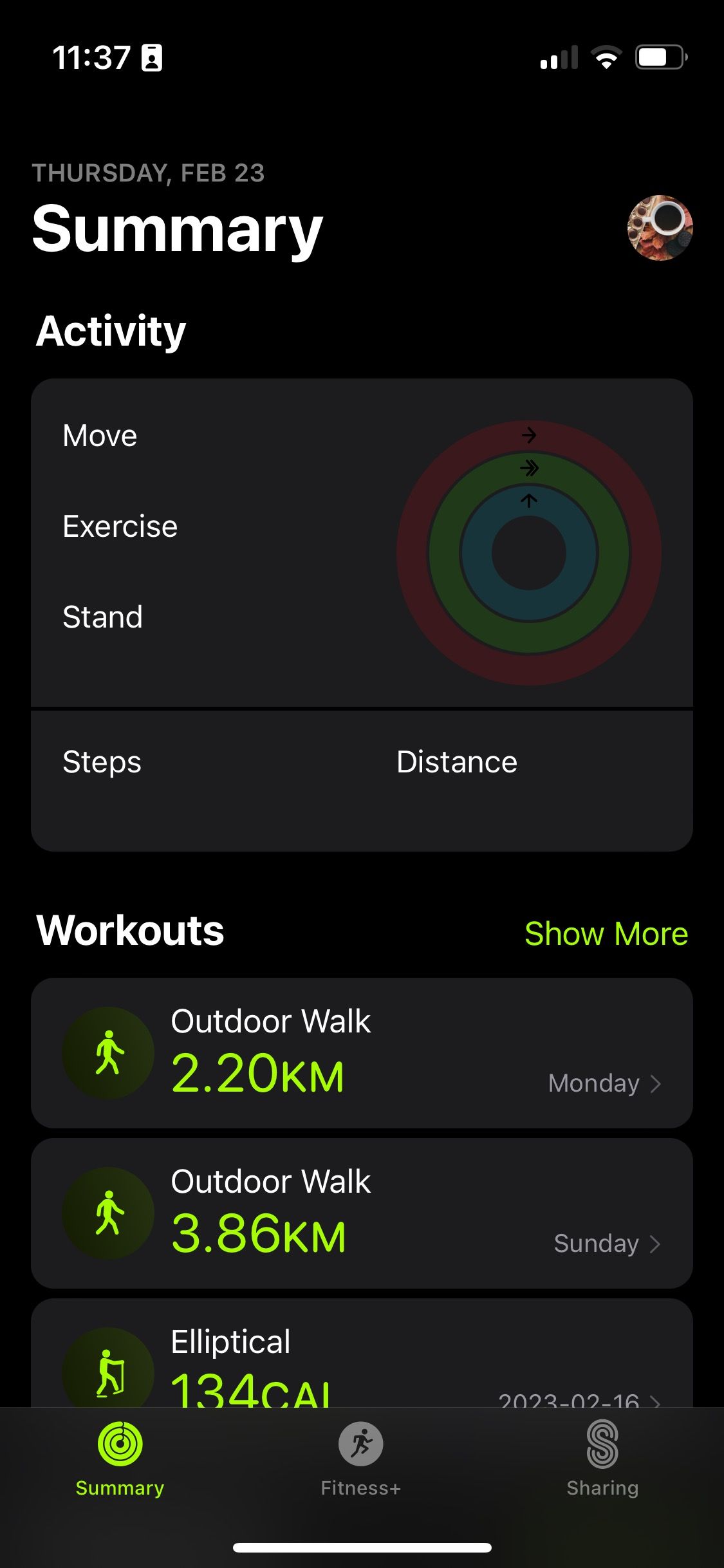
Yes, you can add workouts to the Apple Fitness app. Use the app to track and log your exercises. Make sure your Apple Watch is connected for accurate data. You can view workout history and progress in the app.
Can I Manually Add To The Apple Fitness App?
You cannot manually add workouts directly to the Apple Fitness app. Track workouts using compatible devices or apps. Sync data through the Health app for comprehensive fitness tracking. Use third-party apps for additional workout logging and then integrate them with Apple Health for better accuracy.
How To Add Custom Workouts In Apple Fitness?
Open the Apple Fitness app. Tap “Workouts,” then “Create Workout. ” Choose type, duration, and customize details. Save it.
What If I Forgot To Record Workout On Apple Watch?
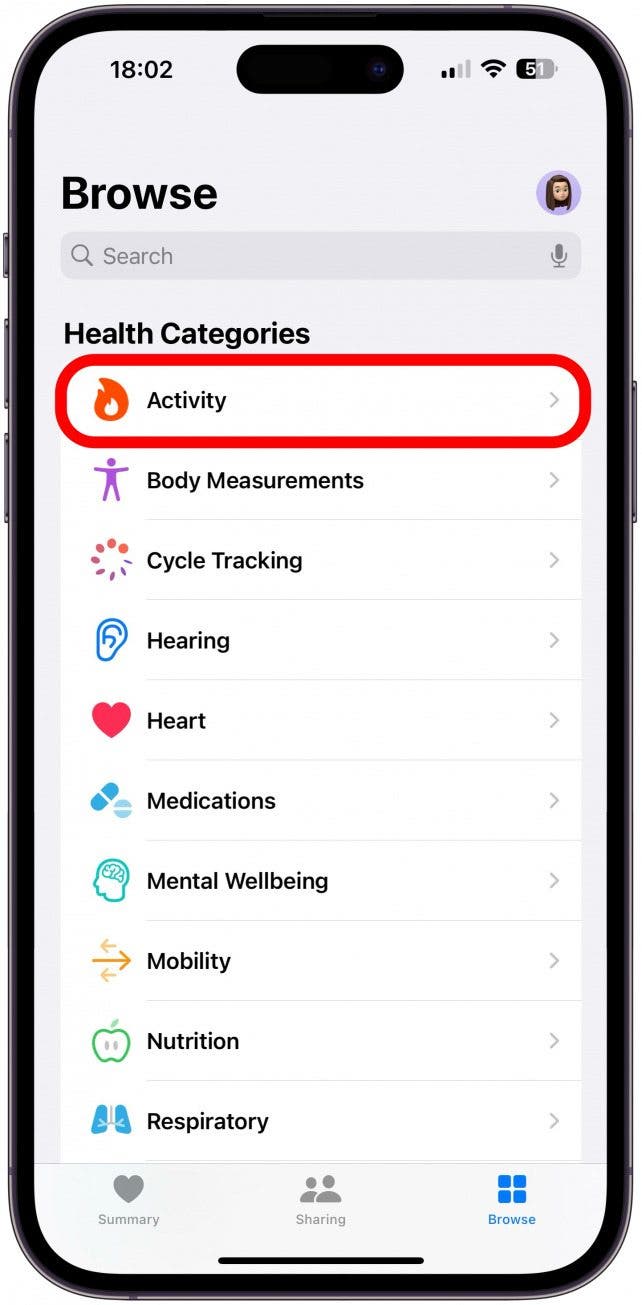
Manually add the workout using the Health app on your iPhone. Tap “Health Data,” then “Activity,” and select “Workouts. ” Enter details like duration and calories burned. Save to update your activity history. Ensure your Apple Watch is synced for future tracking.
Conclusion
Adding workouts to your fitness app is simple and rewarding. Start by choosing exercises that suit your goals. Follow the app’s instructions to input the workout details. Make sure to track your progress regularly. Adjust exercises as needed for variety and challenge.
This keeps you motivated and helps improve your fitness journey. Remember, consistency is key for effective results. With these steps, your workout routine becomes more structured. Enjoy the benefits of a personalized fitness experience. Stay committed, stay active, and watch your goals become reality.
Your fitness app can be a great partner in achieving health milestones.