Are you ready to turn your vision of a fitness app into reality? Imagine creating a tool that motivates, inspires, and empowers users to reach their health goals.
Whether you’re a seasoned developer or just starting out, developing a fitness app can be both exciting and rewarding. But where do you begin? The process may seem daunting, but with the right guidance, you can create an app that stands out in the crowded market.
You’ll discover the essential steps to making a fitness app that’s not only functional but also engaging. We’ll break down the process into simple, actionable parts, helping you navigate everything from initial planning to final deployment. By the end, you’ll have the knowledge and confidence to bring your fitness app idea to life. Let’s dive in and explore how you can create an app that keeps users coming back for more!
Credit: topflightapps.com
Research And Planning
Creating a fitness app starts with detailed research and planning. Identify target audience needs and analyze competitors. Develop clear goals and map out user-friendly features.
Creating a fitness app involves thorough research and meticulous planning. This phase lays the foundation for your app’s success. Without understanding the market and your audience, your app may miss the mark. You need to define clear goals and features to stand out in a competitive landscape. Let’s dive into the essential components of research and planning for your fitness app.Market Analysis
Begin by analyzing the current fitness app market. Look at existing apps to understand trends, strengths, and weaknesses. Consider what makes popular apps successful. Is it their user interface, community engagement, or unique features? Studying the competition will help you identify gaps and opportunities for your app. Ask yourself: What unique value can your app offer? This question can guide your research, helping you pinpoint the niche your app will fill.Identifying Target Audience
Defining your target audience is crucial. Who will use your app? Beginners seeking guidance, or seasoned athletes tracking progress? Maybe both? Understand their needs and preferences. Use surveys or social media to gather insights directly from potential users. Think about your ideal user. What challenges do they face, and how can your app solve them? Knowing this will help tailor your app to meet their expectations.Defining App Features
Based on your research, decide on the features your app will offer. Prioritize functionalities that address your audience’s needs. Consider adding workout plans, progress tracking, and nutritional advice. Balance essential features with innovative ideas that set your app apart. But remember, simplicity is key. Overloading your app with features can overwhelm users. Focus on creating a seamless and intuitive experience. By carefully researching and planning, you lay the groundwork for a successful fitness app. Are there any features you’ve always wished a fitness app had? Integrating them might be your app’s selling point.
Credit: www.exercise.com
Designing The User Interface
Creating a fitness app involves designing a user-friendly interface. Focus on clear navigation and intuitive controls. Ensure the design is visually appealing to motivate users.
Creating an effective fitness app requires careful attention to designing the user interface (UI). Your app’s UI is the first thing users see, and it plays a critical role in their overall experience. A well-designed UI can make your app intuitive and engaging, encouraging users to return. But how do you achieve this balance of aesthetics and functionality?Wireframing
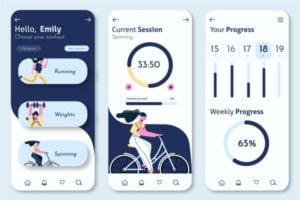
Start with wireframing to outline your app’s basic structure. Think of wireframes as the blueprint of your app. They help you visualize the layout of different screens and how users will navigate through them. Use simple shapes and lines to represent buttons, menus, and content areas. Tools like Sketch or Figma can be handy for this. Focus on functionality over form at this stage. Consider the flow of your app: How easily can a user move from tracking their workout to checking their progress? Your wireframe should guide this journey seamlessly.User Experience Design
User Experience (UX) design is about making the app easy and enjoyable to use. Have you ever been frustrated by an app that was difficult to navigate? A poor UX can turn users away quickly. Aim for simplicity and clarity. Each screen should have a clear purpose and require minimal effort from the user. Implement features like intuitive navigation bars and clear calls-to-action. Always prioritize the user’s goals and preferences. Testing is crucial here—gather feedback and refine your design accordingly.Visual Design Elements
Visual design brings your app to life, transforming wireframes into a polished product. It involves choosing colors, fonts, and images that align with your brand and appeal to your target audience. Consider the emotional impact of colors. Blues might convey calmness, while reds can be energizing. Select fonts that are readable on various screen sizes and resolutions. Remember, consistency is key. Maintain uniformity in design elements across the app to create a cohesive look. With these elements in place, your fitness app will not only function well but also provide an engaging and visually appealing user experience. How will you ensure your app stands out in the crowded fitness market?Development Process
The development process of a fitness app involves strategic planning and execution. Creating an app that stands out requires careful attention to detail. Each stage plays a crucial role in building a successful app. Let’s explore the steps involved in the development process.
Choosing Technology Stack
The technology stack determines the foundation of your app. It influences the app’s performance and scalability. Select programming languages and tools that suit your app’s requirements. Popular choices include JavaScript, Swift, and Kotlin. Consider frameworks like React Native for cross-platform compatibility. Choose databases that offer efficiency and speed.
Backend Development
Backend development focuses on server-side components. It handles data storage and security. Implement robust APIs to enable smooth interaction between app and server. Ensure data processing is efficient. Security measures must protect user information. Choose cloud services for flexible and scalable infrastructure.
Frontend Development
Frontend development involves designing the user interface. It ensures the app is visually appealing and user-friendly. Use design principles to create intuitive navigation. Implement responsive design for various devices. Focus on delivering seamless user experience. Test the interface for usability and accessibility.
Integrating Key Features
Building a fitness app involves adding essential features like workout tracking, user profiles, and progress monitoring. Offer personalized exercise plans and nutrition tips to engage users. Ensure the app is user-friendly and integrates seamlessly with wearable devices for a complete fitness experience.
Creating a fitness app requires integrating essential features. These features enhance user experience. They also ensure users remain engaged and motivated. Each component plays a critical role. From tracking workouts to building community support, every feature matters.Workout Tracking
Workout tracking is crucial. It monitors progress. Users can log exercises, sets, and reps. This helps in setting goals. Visual progress graphs motivate users. The app should offer varied workout types. Include strength, cardio, and flexibility. A calendar view helps plan routines. Push notifications remind users to stay active.Nutrition Planning
Nutrition planning is vital. A balanced diet supports fitness goals. Users can track meals and calories. The app should offer meal suggestions. Customizable meal plans cater to individual needs. Barcode scanning simplifies food logging. Users can access a database of foods. This ensures they make healthy choices.Community Features
Community features boost motivation. Users can connect with friends. Sharing achievements builds support. The app should have group challenges. Leaderboards encourage friendly competition. Discussion boards provide a space for questions. Users can share tips and experiences. This fosters a sense of belonging. `Testing And Feedback
Testing and feedback play a crucial role in making a fitness app. They help identify issues and improve user experience. Gathering user opinions ensures the app meets real needs effectively.
Creating a fitness app is an exciting journey, but it doesn’t end with development. Testing and feedback are crucial steps to ensure your app meets user expectations and delivers a seamless experience. Without these, even the most innovative app may fail to resonate with users. So how do you ensure your app is ready for the market? Let’s dive into the critical processes of testing and feedback.Beta Testing
Beta testing is your first real-world trial. Gather a group of testers who represent your target audience. This is your chance to catch bugs and issues before the app goes public. Have you considered the diversity of your test group? Ensure your beta testers vary in age, fitness level, and tech-savvy to reflect your potential users. This diversity will help you identify a wide range of issues and preferences. During beta testing, encourage testers to explore every aspect of the app. Aim for comprehensive feedback. This will help you pinpoint areas for improvement.User Feedback Collection
After beta testing, collecting user feedback is crucial. Feedback helps you understand how users interact with your app. Use multiple channels to collect feedback. Surveys, social media, and in-app feedback forms are effective. Each platform offers unique insights into user behavior. Are you listening to your users? Pay attention to recurring comments and suggestions. They often highlight areas that need immediate attention.Iterative Improvements
Once you’ve gathered feedback, it’s time for iterative improvements. This is a continuous process where you refine your app based on user input. Prioritize changes based on user feedback. Focus on fixes that enhance user experience and address common issues. Have you considered a feedback loop? Implement a system where users can see their suggestions in action. This fosters trust and engagement. Incorporating feedback is not just about fixing bugs. It’s about evolving your app to better serve your users. This process can be the difference between a good app and a great one. As you refine your app, ask yourself: Are you meeting user expectations? Regular updates show your commitment to delivering a top-notch experience. Keep improving, keep engaging, and watch your fitness app thrive in the competitive market.
Credit: www.youtube.com
Deployment And Launch
Deployment and launch mark the final stages of fitness app creation. This phase brings your app to the public and starts its journey in the market. The goal is to ensure a successful introduction to potential users.
App Store Optimization
App Store Optimization (ASO) improves your app’s visibility. Start with a catchy and relevant app name. Use keywords that describe your app’s features. Write a concise and engaging app description. Add high-quality screenshots and videos to showcase the app. Encourage positive user reviews and ratings. Regularly update your app to fix bugs and add new features.
Marketing Strategies
Effective marketing strategies can attract new users. Utilize social media platforms to spread the word. Create engaging content like videos and infographics. Collaborate with fitness influencers to reach a broader audience. Consider running online ads targeting fitness enthusiasts. Offer promotional discounts or free trials to entice users.
Launch Events
Plan a launch event to create buzz around your app. A virtual launch event can reach a global audience. Invite bloggers and journalists to cover the launch. Offer exclusive insights or behind-the-scenes content. Encourage attendees to share their experience on social media. Launch events create excitement and drive initial downloads.
Post-launch Maintenance
Post-launch maintenance ensures your fitness app runs smoothly and stays updated. Fix bugs, improve features, and enhance user experience. Regular updates keep users engaged and satisfied.
Creating a fitness app is just the beginning of a journey. Once your app hits the market, the real work begins with post-launch maintenance. This crucial phase ensures your app remains relevant, functional, and user-friendly. Neglecting it could mean losing users and missing out on valuable feedback. So, how do you keep the momentum going and ensure your fitness app thrives?Bug Fixes And Updates
Bugs are inevitable in any app. Regular updates are your best ally in addressing these pesky issues. Prioritize bugs that affect user experience the most. Consider a scenario where a user reports a crash during a workout session. This is not just an inconvenience; it could lead users to uninstall your app. Swiftly addressing such issues shows users that you care about their experience. Frequent updates also keep your app fresh. They show users that you are committed to improvement. Have you noticed how some apps seem to get better with every update? That’s no accident. It’s the result of a dedicated team working behind the scenes.User Support
User support is not just about solving problems; it’s about building trust. Providing excellent support can turn a frustrated user into a loyal advocate. Imagine getting instant help when you’re stuck. It feels good, doesn’t it? Your users deserve that same level of attention. Offering multiple channels for support, like chat, email, or even a dedicated support page, can make a big difference. Responsive support also provides valuable insights. It helps you understand common issues users face. This feedback is gold when planning future updates.Feature Enhancements
Your app should evolve alongside your users’ needs. Feature enhancements play a vital role in this evolution. Think about the last time a favorite app of yours introduced a new feature. It probably made you more engaged and maybe even a little excited. That’s what you want for your users. Stay ahead by keeping an eye on trends in the fitness industry. Maybe users are interested in tracking new kinds of workouts or integrating with wearable devices. Could these enhancements make your app indispensable to them? Engage with your users to know what they want. Surveys and feedback forms can be quite revealing. This involvement not only keeps your app relevant but also strengthens your relationship with the users. In the ever-competitive app landscape, post-launch maintenance is your ticket to staying ahead. How will you ensure your fitness app remains at the top of its game?Frequently Asked Questions
How Much Does It Cost To Build A Fitness App?
Building a fitness app can cost between $30,000 to $150,000. Costs depend on features, complexity, and development team. Basic apps are cheaper, while advanced features and integrations increase expenses. Choose a reliable developer to ensure quality and efficiency. Investing in user-friendly design and functionality boosts app success.
Do Fitness Apps Make Money?
Yes, fitness apps make money through subscriptions, in-app purchases, and ads. They also offer premium features for a fee. Partnerships with fitness brands and merchandise sales add to their revenue.
How Much Does It Cost To Build An App Like Myfitnesspal?
Building an app like MyFitnessPal costs between $50,000 and $150,000. Costs vary based on features, design, and development team location. Simple apps might be cheaper, while complex ones require a higher budget. Consider ongoing maintenance and updates, which can add to the overall expense.
How Long Does It Take To Build A Fitness App?
Building a fitness app typically takes 3 to 6 months. Factors affecting timelines include app complexity, features, and team size. Efficient planning and development can help streamline the process. Testing and revisions may add time, ensuring a high-quality user experience.
Conclusion
Creating a fitness app involves clear steps. Start with research to understand user needs. Design an intuitive interface for easy navigation. Focus on essential features like tracking workouts and setting goals. Develop the app using a reliable technology stack. Test thoroughly to ensure smooth functionality.
Launch the app with a marketing strategy to reach your audience. Keep updating it based on feedback. These steps help build a successful fitness app. Remember, user satisfaction is key. Regular updates improve user experience. Stay committed to quality and user engagement.
Your fitness app can inspire healthier lifestyles.