Are you struggling to make sense of the Apple Fitness app? You’re not alone.
While it’s packed with features to help you stay fit, it can be overwhelming at first glance. Understanding how to navigate this app is crucial for maximizing your workouts and tracking your progress. Imagine the satisfaction of effortlessly monitoring your health stats and achieving your fitness goals with precision.
This guide will demystify the Apple Fitness app, breaking down its components into simple, actionable steps. Ready to unlock the full potential of your workouts and see real progress? Let’s dive in and explore how you can make the most of this powerful tool.
Credit: discussions.apple.com
Getting Started With Apple Fitness App
Getting started with the Apple Fitness App is simple. This app helps track your fitness journey. It offers a user-friendly experience. With just a few taps, you can monitor your health. Let’s explore how to set it up. Understand the basics before diving into workouts.
Setting Up Your Profile
Begin by opening the Apple Fitness App. You need to create a profile. This includes entering your age, weight, and height. Accurate data ensures better tracking. It personalizes your fitness goals. You can update this information anytime. A complete profile helps the app understand your needs.
Navigating The Home Screen
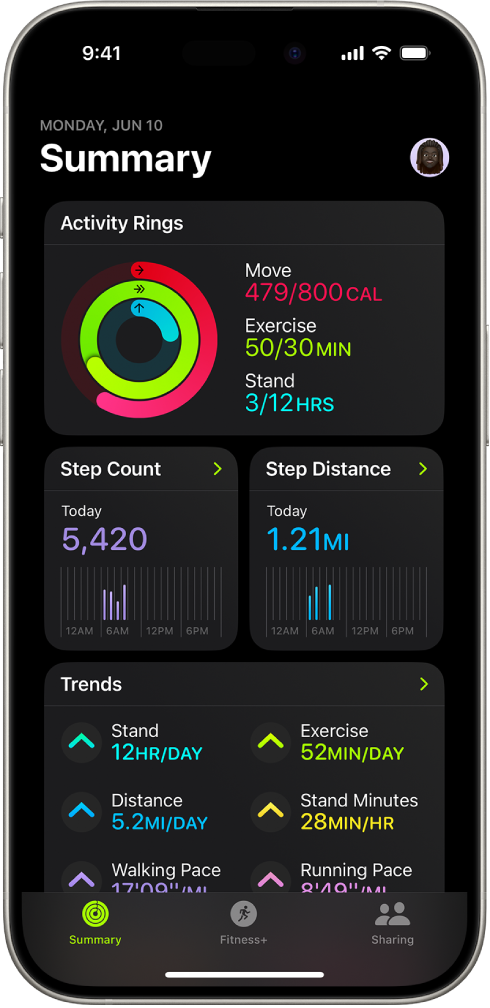
The home screen is where you start. It displays your daily activity. Rings show your movement, exercise, and standing goals. Closing these rings is a fun challenge. Tap them for more details. See your progress over time. You can also access workouts and trends. Everything you need is here. Simple and organized.

Credit: www.iphonelife.com
Understanding Activity Rings
Activity Rings in the Apple Fitness app help track your daily movement. The Move ring measures calories burned. The Exercise ring counts minutes of brisk activity. The Stand ring reminds you to stand up every hour. Understanding these rings aids in monitoring fitness progress.
Understanding Activity Rings Imagine having a daily guide that nudges you towards better health, helping you stay active and mindful of your fitness goals. Apple Fitness App’s Activity Rings do exactly that. These colorful rings are more than just visual indicators; they provide insights into your daily activity levels, urging you to move, exercise, and stand more frequently. Let’s dive into the specifics of each ring to understand how they can help you achieve your fitness aspirations.Move Ring Insights
The Move Ring measures your active calories burned throughout the day. It’s a personal goal tailored to your lifestyle, pushing you to be more active. Are you meeting your daily calorie goal? This ring adjusts over time based on your activity levels, encouraging you to gradually increase your target for continuous improvement. Take note of days when you easily close this ring. What’s different? Perhaps you took the stairs instead of the elevator or walked to work. Tracking these habits can help you understand what works best for you.Exercise Ring Details
Your Exercise Ring tracks minutes of brisk activity. It’s not just about hitting the gym; a quick walk or a cycle ride counts too. The goal is set at 30 minutes, but you can adjust it based on your routine. Think of days when you felt more energetic. Did you notice a change when you exercised? Regularly closing this ring can boost your mood and energy levels. Experiment with different activities and find what makes you feel alive.Stand Ring Explanation
The Stand Ring is all about breaking prolonged sitting periods. It encourages you to stand and move for at least one minute per hour over 12 hours. It’s a gentle reminder that sitting is the new smoking when it comes to health risks. Have you ever felt stiff after sitting for too long? This ring helps you combat that. It’s a simple yet effective way to ensure you’re not sedentary, promoting better circulation and energy throughout your day. By understanding and engaging with these rings, you can create a healthier lifestyle that suits you. What changes will you make today to close your rings? The choice is yours, and the benefits are waiting.Tracking Workouts
The Apple Fitness App is a powerful tool for tracking your workouts and enhancing your fitness journey. Whether you’re a beginner or a seasoned athlete, understanding how to navigate its features can make a significant difference in your progress. Let’s dive into how you can effectively track your workouts and use the app to reach your fitness goals.
Selecting Workout Types
Before you start a workout, the Apple Fitness App lets you choose from a variety of options. From running and cycling to yoga and strength training, select the type that matches your activity. This ensures accurate tracking and personalized insights.
Have you ever noticed how different workouts make you feel? By selecting the correct workout type, you can better understand which activities boost your mood and energy. Next time you hit the gym, take a moment to log the correct activity and see how it impacts your day.
Monitoring Progress
The app provides a comprehensive overview of your workout history. This helps you see patterns, such as which days you’re most active or which workouts you repeat. Keeping an eye on these trends can motivate you to maintain consistency and push past plateaus.
Imagine checking your progress and realizing you’ve been more active this month than ever before. This kind of insight can boost your confidence and commitment. How often do you review your workout stats to celebrate these small victories?
Using Metrics For Improvement
Metrics such as heart rate, calories burned, and distance traveled are invaluable for tracking your fitness journey. Use this data to set realistic goals and challenge yourself. If your heart rate is consistently low during workouts, consider increasing intensity for better results.
Think about the last time you adjusted your workout based on these metrics. Did you notice an improvement in your performance or how you felt afterward? Adjusting your routine based on real-time data can lead to significant improvements over time.
By mastering these elements of the Apple Fitness App, you can turn your device into a personal coach and motivator. What will you discover about your workouts today?
Utilizing Health Metrics
Utilizing health metrics in the Apple Fitness App can transform how you understand your body’s performance and needs. The app is packed with data that can help you track your progress and make informed decisions about your fitness journey. From heart rate monitoring to calorie counting and sleep analysis, each metric offers unique insights. But how do you make sense of these numbers?
Heart Rate Monitoring
Ever wondered why your pulse races during a workout? Heart rate monitoring can reveal your body’s response to exercise intensity. The Apple Fitness App lets you track your heart rate in real-time, helping you adjust your workouts for maximum efficiency.
Set heart rate zones to optimize fat burning or improve cardiovascular endurance. Are you pushing too hard or not hard enough? The app can guide your pace, ensuring you’re not overexerting or underperforming.
Imagine finishing a run and checking your heart rate data. You see spikes during sprints and a gradual drop during cooldown. This data not only informs your fitness level but can also alert you to potential health issues.
Calorie Counting
Understanding calorie burn can be a game-changer in achieving your fitness goals. The Apple Fitness App estimates calories burned based on activity type, duration, and intensity. This helps you balance your intake and expenditure.
Track your calories burned during workouts and compare them against your daily goals. Are you burning enough to meet your weight loss target? Adjust your activities to align with your objectives.
Seeing those calories add up after a challenging workout can be incredibly motivating. It’s tangible proof of your effort and can inspire you to push further tomorrow.
Sleep Analysis
Quality sleep is crucial for recovery and overall well-being. The Apple Fitness App offers sleep analysis, providing insights into your sleep patterns and quality. You can view data on how long you slept, the stages of sleep, and any disruptions.
Analyze your sleep trends to identify factors affecting your rest. Are late-night screen sessions ruining your sleep? Adjust your habits to improve your nightly recharge.
Imagine waking up refreshed and checking your sleep data. You see deep sleep cycles and fewer disturbances. This information not only boosts your mood but can enhance your daily performance.
Understanding these metrics can lead to significant improvements in your fitness journey. How will you use this data to shape your future workouts and lifestyle choices?
Challenges And Achievements
Tracking your fitness journey can feel like navigating a maze, but the Apple Fitness App simplifies this process with its ‘Challenges and Achievements’ feature. This tool not only motivates you but also adds a splash of fun to your workouts. By setting personal goals, joining competitions, and earning badges, you’re empowered to push your limits and celebrate your milestones. Let’s delve into how you can make the most of this exciting feature.
Setting Personal Goals
Personal goals are the stepping stones to your fitness journey. They are the targets you set for yourself based on your capabilities and aspirations. With the Apple Fitness App, you can customize your workout objectives to align with your lifestyle. Whether it’s running a mile daily or hitting a certain calorie burn, setting these goals gives you a clear path to follow.
Imagine how satisfying it would be to see your progress charted out day by day. Each achievement, no matter how small, nudges you toward the next one. Are your goals ambitious enough to challenge you yet realistic enough to attain?
Joining Competitions
Feel the thrill of healthy competition by joining challenges with friends or fellow app users. Competitions are not just about winning but pushing your limits and having fun while doing it. With the Apple Fitness App, you can invite friends to compete in weekly challenges.
Why not start a friendly competition with your workout buddy? A little rivalry can boost your motivation and keep you committed. The camaraderie and shared excitement make each workout session something to look forward to.
Earning Badges And Awards
Badges and awards transform your fitness journey into a treasure hunt. Every achievement unlocks a new badge, celebrating your dedication and progress. These digital trophies are more than just images; they symbolize your hard work and perseverance.
Think of the pride you’ll feel when you earn that elusive badge for completing a month-long challenge. The Apple Fitness App makes each milestone memorable, turning your exercise routine into a rewarding adventure. What badge are you aiming for next?
Embrace the ‘Challenges and Achievements’ feature in the Apple Fitness App to redefine your workout experience. Every goal set, competition joined, and badge earned is a testament to your journey towards better health.
Integrating With Other Apps
Understanding the Apple Fitness App is easier with app integration. Connect it with other apps for seamless data tracking. This helps in viewing all your fitness activities in one place, making it simpler to monitor progress and set new goals.
Integrating with other apps can elevate your experience with the Apple Fitness App, making it a more powerful tool for tracking your health journey. By syncing it with various apps, you can gain a comprehensive view of your fitness and health data. This seamless integration allows for more personalized insights and better tracking of your progress.Syncing With Health App
Did you know that syncing your Apple Fitness App with the Health App can provide a more holistic view of your health? By doing this, all your data is gathered in one place, giving you a complete picture of your daily activity, workouts, and even sleep patterns. To sync, ensure both apps are updated to the latest versions. Open the Health App, tap on your profile picture, and then select ‘Apps.’ Find the Fitness App and toggle the switches for the data you want to share. Now, your workouts, steps, and other health metrics will automatically sync, offering insights at your fingertips.Connecting Third-party Apps
Expanding your fitness tracking with third-party apps can add a new dimension to your health insights. Whether it’s a nutrition app or a meditation guide, connecting these apps to your Apple Fitness App can enhance your routine. Start by identifying which apps you want to connect. Many popular apps like MyFitnessPal or Strava offer seamless integration with Apple Fitness. In the settings of these third-party apps, look for an option to connect with Apple Health. By following these simple steps, you can streamline your fitness and wellness data, all while keeping everything organized. Have you tried integrating your Apple Fitness App with other apps? It’s a game-changer for those looking to optimize their health journey. Whether you’re a seasoned athlete or just starting, this integration can provide invaluable insights and motivation. Take control of your fitness journey by harnessing the power of these integrations. Are you ready to see the bigger picture of your health?Expert Tips For Maximizing Benefits
The Apple Fitness App offers a wealth of features. These can boost your fitness journey. With the right strategies, you can make the most of it. Here are expert tips to maximize your benefits.
Customizing Notifications
Notifications keep you updated. They can remind you of workouts or goals. Customize them to suit your routine. Go to settings in the app. Choose alerts that fit your lifestyle. This helps you stay on track.
Utilizing Advanced Features
The app offers advanced features. Use these for detailed insights. Track heart rate and calories burned. Review your workout history. This data helps you understand your progress. It shows where you need improvement.
Maintaining Motivation
Staying motivated is key. The app offers badges and achievements. These small rewards inspire you. Set realistic goals within the app. Celebrate each milestone. This keeps you engaged and motivated.
Credit: support.apple.com
Frequently Asked Questions
How Do I Read My Apple Fitness Data?
Open the Fitness app on your iPhone. Tap the “Summary” tab to view daily activity. For detailed data, select specific workouts or health metrics. Use the “Trends” tab to track progress over time. Sync your Apple Watch for comprehensive insights.
How To Read Fitness Apple App?
Open the Fitness app on your Apple device. Select a category like Activity or Workouts. Review the displayed metrics such as steps, calories, and heart rate. Tap each metric for more detailed information. Use the trends feature to track progress over time.
How To Understand The Apple Watch Fitness App?
Explore the Apple Watch Fitness app by opening it from your watch’s menu. Track workouts, monitor heart rate, and set goals. Customize notifications and view detailed activity summaries on the app. Sync with your iPhone for in-depth insights and personalized fitness recommendations.
Stay active with motivational challenges.
What Do Total Calories Mean On The Fitness App?
Total calories on the Fitness app represent the sum of calories burned through exercise and daily activities. It helps track energy expenditure and supports weight management goals. Monitoring total calories can optimize workouts and improve overall health.
Conclusion
Mastering the Apple Fitness App can enhance your fitness journey. It helps track progress. Understand calories burned and heart rate. Set goals to stay motivated. Monitor workouts for better results. Remember, consistency is key to success. Use the app daily for best outcomes.
It’s simple to navigate once familiar. Stay patient and explore features. Make fitness a fun part of life. Share achievements with friends and family. Turn exercise into a habit. Enjoy healthier living through smart tracking. Embrace the journey to better health.
The app supports every step along the way. Keep moving forward!