Unlocking the full potential of your iPhone can be as simple as setting up a fitness app to help you stay on top of your health goals. Imagine having a personal trainer right in your pocket, ready to guide you through workouts, track your progress, and motivate you to push your limits.
The best part? It’s easier than you might think to get started. Whether you’re a fitness newbie or a seasoned athlete, setting up a fitness app on your iPhone can transform your health journey. Dive in with us, and discover how a few taps on your screen can lead to a healthier, more active lifestyle.
Are you ready to take control of your fitness with just a few swipes? Let’s get started!
Choosing The Right Fitness App
Choosing the right fitness app for your iPhone can be overwhelming. With countless options available, it’s vital to find the one that fits your needs. A suitable app can boost your motivation and track your progress effectively. This section will guide you in selecting the best app for your fitness journey.
Popular Fitness Apps
Many fitness apps offer diverse features for various needs. MyFitnessPal is great for tracking your food intake and calories. Fitbit is known for its comprehensive activity tracking. Nike Training Club offers workouts tailored to different fitness levels. These apps are widely recognized and have strong user reviews.
Features To Consider
When choosing a fitness app, consider its compatibility with your iPhone. Check if the app syncs with Apple Health. Look for apps with easy-to-use interfaces and personalized workout plans. Ensure the app provides progress tracking and goal setting. Some apps offer community support and challenges to keep you motivated. Pay attention to user reviews on the App Store for honest feedback.
Downloading And Installing
Setting up a fitness app on an iPhone begins with downloading it from the App Store. Follow installation prompts to get started quickly. Customize settings to track your workouts and health goals effectively.
Setting up a fitness app on your iPhone can be a game-changer for your workout routine. Whether you’re tracking your steps, monitoring your heart rate, or finding new workouts, having the right app is crucial. To get started, you need to know how to download and install the app efficiently. This process is simple, yet there are a few tips and tricks that can make it even smoother.App Store Navigation
Navigating the App Store is the first step. Open the App Store on your iPhone by tapping its icon. Once inside, use the search bar at the top to find fitness apps. Type in specific names if you have recommendations or search for general terms like “fitness” or “workout.” Take your time to read reviews and check the ratings. This will give you insight into the app’s effectiveness and user satisfaction.Installation Steps
After choosing an app, tap the download button to begin the installation. Your iPhone may ask for your Apple ID password or use Face ID. This ensures security and verifies your identity. Once the app is installed, open it from your home screen. You might need to set up an account or input personal data to personalize your experience. Have you ever downloaded an app that transformed your fitness routine? Your experience can be invaluable to others. Share tips or recommend apps that worked for you. Setting up your fitness app is just the beginning. Think about what you’ll achieve with this new tool. Are you ready to track your progress and reach new goals? Remember, the right app can make a difference. Enjoy exploring and maximizing your fitness journey with your iPhone.Account Creation
Setting up a fitness app on your iPhone is simple. Begin by downloading your chosen app from the App Store. Follow on-screen instructions to create an account, enter your details, and personalize your fitness goals.
Setting up a fitness app on your iPhone begins with creating an account. This step is crucial because it personalizes your fitness journey and stores all your health data. Whether you’re a seasoned athlete or just starting your fitness journey, having a tailored account can make all the difference.Sign Up Options
You have several sign-up options to choose from when creating your account. Most fitness apps allow you to sign up using your email or social media accounts like Facebook or Google. This flexibility lets you pick the method that feels most secure and convenient for you. Signing up with an email might require a bit more time but offers the advantage of separating your fitness data from your social profiles. On the other hand, using social media accounts for sign-up can speed up the process and make logins seamless.Profile Setup
Once you’ve signed up, it’s time to set up your profile. Start by entering your basic information such as age, gender, and fitness level. This data helps the app tailor workouts and recommendations specifically for you. Consider adding details like your fitness goals and any health concerns. Maybe you want to run a marathon or simply improve your daily step count. By sharing this information, the app can provide more relevant insights and progress tracking. Imagine the app as your digital fitness coach. The more it knows about you, the better it can assist you. Wouldn’t it be great if your app could remind you to drink water or take a short walk based on your personal habits? Setting up your profile thoroughly can be a game-changer. It transforms the app from a simple tool into a personalized guide, keeping you motivated and on track. So, take a few extra minutes to input your details and watch your fitness journey become more engaging and effective.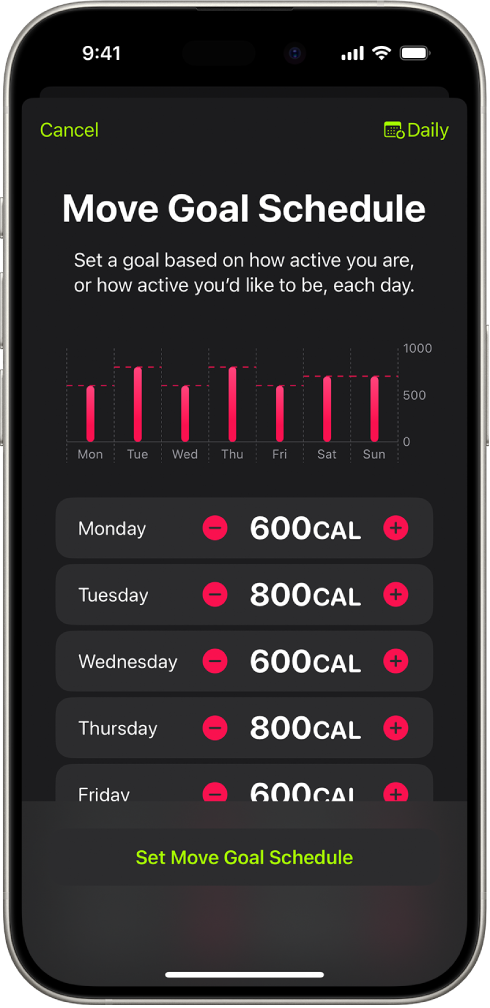
Credit: support.apple.com
Setting Goals
Easily set up the Fitness app on your iPhone to track workouts and health goals. Begin by opening the app, adjusting settings to match personal fitness objectives, and integrating other health apps for a comprehensive view. Stay motivated and monitor progress effortlessly with clear, user-friendly features.
Setting goals is the heart of any fitness journey, especially when using a fitness app on your iPhone. Whether you’re a fitness newbie or a seasoned pro, defining clear objectives can transform your workout routine. Having specific targets keeps you motivated and helps track your progress effectively.Defining Fitness Objectives
Start by identifying what you truly want to achieve. Is it weight loss, muscle gain, or just staying active? Pinpointing your main goal helps in setting realistic and attainable targets. It’s essential to be specific. Instead of saying “I want to get fit,” aim for “I want to run a 5k in three months.” Specific objectives make it easier to measure success and adjust plans if needed. Think about past experiences. Have you set fitness goals before? Reflect on what worked and what didn’t. This reflection can guide you in creating more effective goals. Remember, the best objectives are those that challenge you but remain within reach.Customizing Metrics
Once your objectives are clear, it’s time to customize the metrics within the app. This means choosing what data you want to track, such as steps, calories, or active minutes. Tailor these metrics to align with your goals. Personalize your dashboard. If your goal is to increase cardiovascular endurance, focus on metrics like distance and time. For strength training, track the number of sets and reps. Regularly review your metrics. Are they helping you get closer to your goals? If not, don’t hesitate to adjust them. Fitness is a dynamic process, and so should be your tracking methods. Have you ever felt overwhelmed by too much data? Simplify your metrics to avoid this. Focus only on what truly matters to you and your journey. This keeps your fitness routine not only effective but also enjoyable. By defining your fitness objectives and customizing your metrics, you’re setting a strong foundation for success with your iPhone fitness app. What goals are you setting today?Syncing Devices
Syncing devices is crucial for a seamless fitness experience on your iPhone. Connecting wearables and integrating them with the Health app can enhance your fitness journey. This section will guide you through these processes, ensuring your devices work together effectively.
Connecting Wearables
Start by ensuring your wearable device is compatible with your iPhone. Check the manufacturer’s website for compatibility information. Activate Bluetooth on your iPhone for smooth connectivity. Open the settings on your wearable device. Select ‘Connect’ or ‘Pair’ with your iPhone. Follow the instructions provided. Once connected, your wearable will sync data directly.
Make sure your wearable is charged and in close proximity. Keep your iPhone updated to the latest software version. This prevents connection issues and ensures smoother operation. Regularly check for any firmware updates on your wearable device. Updates can improve performance and connectivity.
Integration With Health App
Integrate your wearable with the Health app to centralize your fitness data. Open the Health app on your iPhone. Tap on ‘Sources’. Find your wearable device in the list. Tap to enable data sharing. This allows the Health app to collect and store data from your device.
After integration, review the data settings. Ensure the correct data types are enabled. This includes steps, heart rate, and calories burned. Customize data permissions based on your preferences. Regularly check the Health app for new data entries. This helps you track your progress efficiently.
Credit: discussions.apple.com
Exploring Features
Discover how to set up a fitness app on your iPhone with ease. Follow simple steps to track workouts, monitor progress, and achieve health goals. Start your fitness journey today with a few taps.
Setting up a fitness app on your iPhone can be a game-changer for your health journey. With a variety of features at your fingertips, you’ll have the tools you need to keep motivated and track your progress. Whether you’re a seasoned athlete or just starting, knowing how to make the most of these features can enhance your workout routine and keep you on track to achieving your fitness goals.Tracking Workouts
The fitness app allows you to log every detail of your workouts. You can select from a range of exercises, whether you’re hitting the treadmill, lifting weights, or doing yoga. If you love running, try setting goals for distance or time. Imagine completing a 5K and seeing every mile logged with precision. It’s not just about recording; it’s about understanding your patterns. You might notice you’re faster in the mornings or stronger after a rest day. Your workout history builds up a library of your fitness journey. It’s like having a personal trainer, showing you how far you’ve come and what you might try next. What workouts have you logged today?Monitoring Progress
Seeing your progress is one of the most motivating aspects of a fitness app. The app provides visual summaries of your achievements, whether it’s calories burned or personal records broken. You get to see your growth in real-time. For example, you might see a chart showing a steady increase in your weekly running distance. This visual feedback can be the push you need to keep going. Have you ever considered comparing your current stats to those from a month ago? Set milestones and celebrate small victories. Maybe you’ve increased your strength training weights or improved your cardio endurance. These features help you recognize and appreciate the improvements, no matter how small they may seem. Are you ready to celebrate your next fitness milestone? The iPhone fitness app is more than just a tool; it’s a companion in your health journey. By exploring its features, you empower yourself to take control of your fitness, track your activities, and monitor your progress with ease. Ready to dive into your fitness journey with your iPhone?Utilizing Notifications
Utilizing notifications effectively can transform your fitness journey with an iPhone app. Notifications aren’t just reminders; they’re your personal motivators and accountability partners. As you set up your fitness app, ensure you’re getting the most out of these features to boost your progress and keep you on track.
Setting Reminders
Setting reminders is crucial in maintaining a consistent workout schedule. The fitness app on your iPhone can send you notifications to remind you about your workout sessions. Think of it as having a personal trainer who taps you on the shoulder and says, “It’s time to move!”
To set these reminders, go to the settings of your fitness app and choose the days and times that fit your routine. If you’re like me, mornings might be your best time to hit the gym before the day’s chaos begins. By setting reminders, you ensure that your commitment to fitness doesn’t get lost amidst other daily tasks.
Personalized Alerts
Personalized alerts take notifications to the next level by tailoring them to your specific goals and preferences. Whether it’s tracking your steps, calories burned, or hydration levels, these alerts keep you informed and motivated. They can also remind you to stand, stretch, or take a walk if you’ve been sitting too long.
To customize these alerts, dive into the app’s settings and tweak the notifications to align with your fitness objectives. If you love running, you might set alerts for distance milestones. Or, if weight loss is your goal, calorie tracking notifications can be set. This personalization ensures that each notification is a gentle nudge towards your goal, not just another buzz on your phone.
Have you ever ignored a notification only to regret it later? By making notifications work for you, you transform them from a distraction into a powerful tool for success. What type of notification would be most helpful for you in staying committed to your fitness goals?

Credit: www.youtube.com
Troubleshooting Common Issues
Setting up a fitness app on an iPhone can be simple with clear steps. Common issues often include syncing data or connectivity problems. Ensure the app is updated and check internet settings to smooth out the process.
Setting up a fitness app on your iPhone can be an exciting journey toward a healthier lifestyle. However, like any technology, it might not be smooth sailing right from the start. You may encounter a few bumps along the way. How do you handle these hiccups effectively to keep your fitness goals on track? Let’s dive into some common issues you might face and tackle them head-on with simple solutions.App Crashes
App crashes can be incredibly frustrating, especially when you’re in the middle of tracking a workout. If your fitness app is crashing frequently, try restarting your iPhone first. This simple step can often resolve minor glitches. Ensure your app is updated to the latest version. Developers frequently release updates to fix bugs and improve performance. Head over to the App Store, search for your app, and check if an update is available. Still crashing? Consider freeing up some storage space on your device. Apps need memory to function correctly, and a lack of space can lead to crashes. Delete apps or files you no longer need to make room for your fitness app.Sync Problems
Syncing your fitness data between your iPhone and other devices can be crucial for accurate tracking. If your app isn’t syncing, first check your internet connection. A stable Wi-Fi or data connection is essential for seamless synchronization. Verify that Bluetooth is enabled if your app uses it to connect with wearables. Sometimes, simply toggling Bluetooth off and on can resolve connection issues. Double-check your account settings. Ensure you’re logged into the correct account on both your iPhone and any connected devices. Misconfigured accounts can lead to sync issues. Have you ever faced a sync problem that just wouldn’t resolve? Trying these steps could be the key to ensuring your fitness journey remains uninterrupted. By addressing these common issues with straightforward solutions, you can keep your fitness app running smoothly and focus on achieving your health goals.Frequently Asked Questions
How Do I Get My Iphone To Track My Fitness?
Open the Health app on your iPhone. Enable fitness tracking in the settings. Pair your Apple Watch or use the iPhone’s motion sensors. Ensure location services and motion calibration are on for accurate tracking. Regularly sync your data to monitor your fitness progress.
How Do I Start Fitness On My Iphone?
Open the Fitness app on your iPhone. Tap ‘Get Started’ and follow on-screen instructions to set up. Ensure your Apple Watch is connected for tracking. Customize your goals and preferences in the app settings.
Why Isn’t My Fitness Showing On My Iphone?
Fitness might not show on your iPhone due to disabled Health permissions. Check Settings > Privacy & Security > Motion & Fitness. Ensure “Fitness Tracking” is enabled. Also, update your iOS and restart your device. If issues persist, contact Apple Support for further assistance.
How To Set Up The Fitness App To Get Your Steps On Iphone?
Open the Health app on your iPhone. Tap “Browse,” then “Activity. ” Select “Steps” to view and track your steps. Ensure your iPhone is in your pocket or on your wrist for accurate tracking. Sync with the Fitness app for detailed insights.
Conclusion
Setting up your fitness app on iPhone is simple and rewarding. Follow the steps, and soon you will track your workouts. Stay motivated. Keep pushing towards your goals. The app offers convenience. Access your progress anytime. Your iPhone becomes a fitness companion.
Remember to update the app regularly. Stay informed on new features. Make the most of your fitness journey. Enjoy healthier living, one step at a time. Now, go ahead and set up your app. Start tracking today. Your fitness adventure awaits.
Embrace the journey. Achieve your personal best. Let’s get moving!